A mailbox that files itself, with a person in the loop
This is the application I built and run over a family office's shared investments inbox: it reads every email and attachment that arrives, works out which deal and which period it belongs to, proposes where it should be filed and under what name, and files it only when a reviewer agrees. It is captured here page by page as a static site over an invented inbox, so you can click through exactly what the office uses, with every deal, sender, email, document and signature in it made up.
What it is, and who uses it
A family office with a few hundred private investments receives thousands of documents a year at one shared address: capital-account statements, K-1s, capital calls and distribution notices, rent rolls and monthly property packages, offering memoranda, covenant reports, legal letters, and the long email threads around all of them. Every one of those has to be recognised, renamed and filed in the right folder of the document library, and the ones that matter — a distribution cut, a covenant breach, a statement that never came — have to be noticed by someone. Done by hand it was a part-time job that was always behind.
Documents watches that mailbox. For each email it reads the message and its attachments, identifies the deal from the sender's domain, the names and aliases it knows and the folders it has seen before, works out the document type and the period it covers (from the file name first, then the subject, then the body), and proposes a destination folder and a standard name. A reviewer sees that proposal on a card, with the sentences it was read from, and approves, redirects or declines it. Only then does the file move. The same pipeline handles files dropped into a shared folder and documents returning from e-signature, so there is one registry of deals and one set of rules however a document arrives.
Because the filing is recorded as data, the office gets answers it never had before. The statement tracker lights a cell for every deal, document type and period that was actually filed, so what is missing is a query rather than a memory. Coverage asks the same question of the last six months of email. Red flags are raised from the text of what was read, each one with the sentence that triggered it, and stay open until a person resolves them. And the audit log keeps every decision, proposal and action with the person who made it.
The capabilities
The review queue
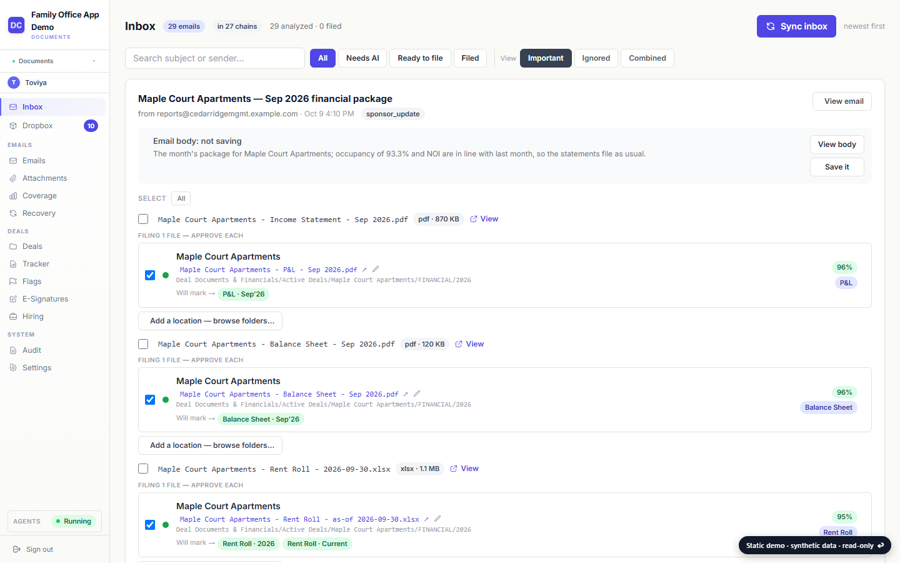
The inbox as a queue of cards: each email, what it carried, which deal and period the reader matched it to, the folder and name it proposes and a line on what it made of the email. Approve, redirect or decline; a declined proposal is remembered as a decision, so the same file is never proposed twice.
Deal registry
Every deal the office tracks with its aliases, the sender domains that write about it, the library folder it files under and the facts read out of its own documents. A new sponsor or a renamed vehicle is a registry edit, not a code change.
Type and period detection
Statements, notices, calls, K-1s, rent rolls and manager packages are recognised by their shape and named consistently; the period comes from the file name before the subject, so a sponsor's own labelling wins over an email's date. Each email chain is treated as one thing, and one copy per folder is the rule.
The statement tracker
Deal by document category by period, lit from the documents actually filed in the library rather than from a checklist, with the family-office platform's own financials cross-checked against it so a figure that was filed and a figure that was booked can be compared.
Coverage
The same question asked of the last six months of email: which deal sent which document for which period, which are late against their cadence, and which have gone quiet.
Red flags
A distribution cut, a covenant breach, an occupancy slide or a capital call out of pattern is flagged from the text of the document with the sentence it was read from, and stays open on the flags page until a person resolves it.
Dropbox queue and e-signature
Files sponsors drop into a shared folder are walked as a tree, read and routed through the same registry, or marked as already on file. Documents sent out for signature are tracked through viewed and signed, and the executed copy is filed back to its deal.
Hiring, kept apart
Blind job postings and the applications they draw run through the same mailbox but are kept entirely apart from the deal mail, with their own queue and their own folder.
The audit log
Every proposal, approval, redirect, decline, filing and flag resolution with the person or process that made it and what it touched, so any file's history can be read back from the day it arrived.
Ten screens, one book
Review queue
The shared inbox as a queue of cards: each email, what it carried, where the reader proposes to file it and a line on what it made of the email, with the buttons that would approve, redirect or decline.
Open →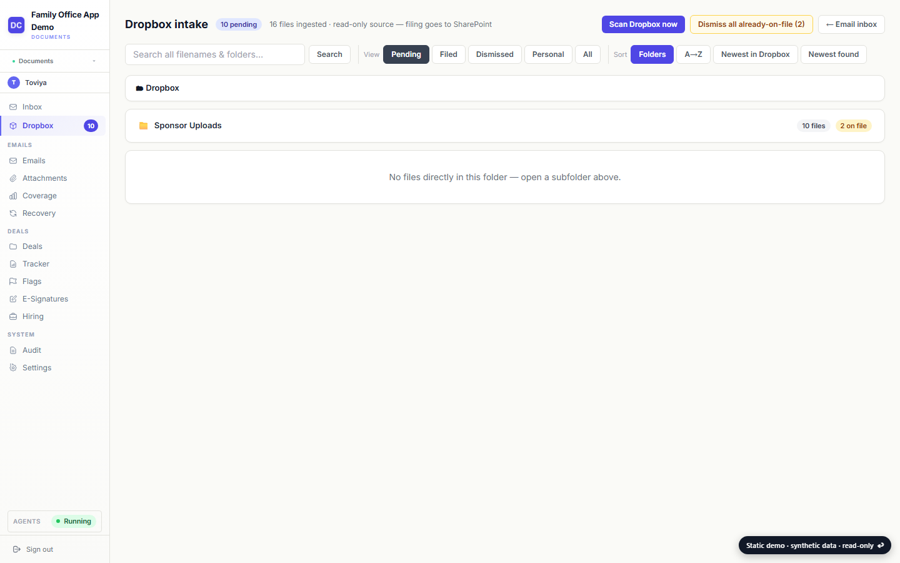
Dropbox queue
Files sponsors drop into a shared folder, walked as a tree, each one read and routed to a deal or marked as already on file.
Open →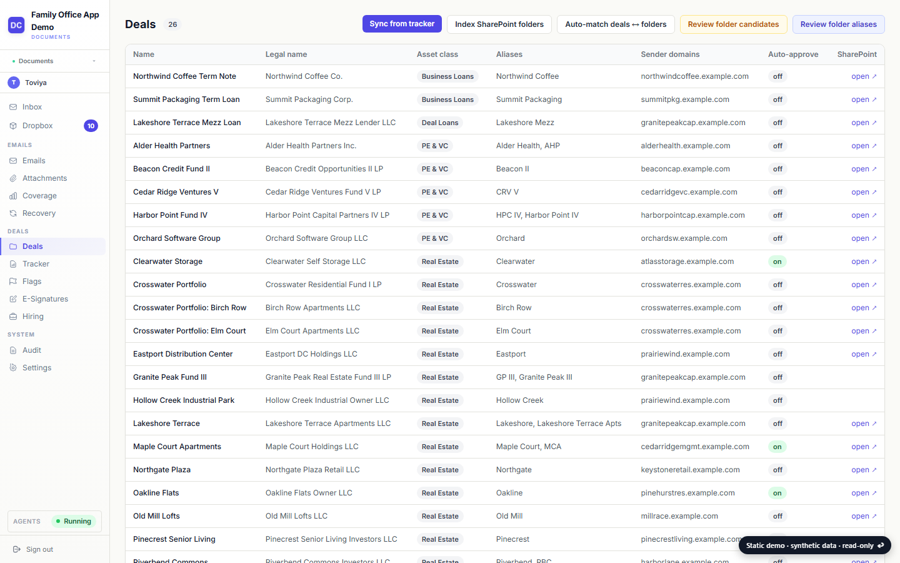
Deal registry
Every deal the office tracks, with the aliases, sender domains and library folder each one files under, and the documents filed to it.
Open →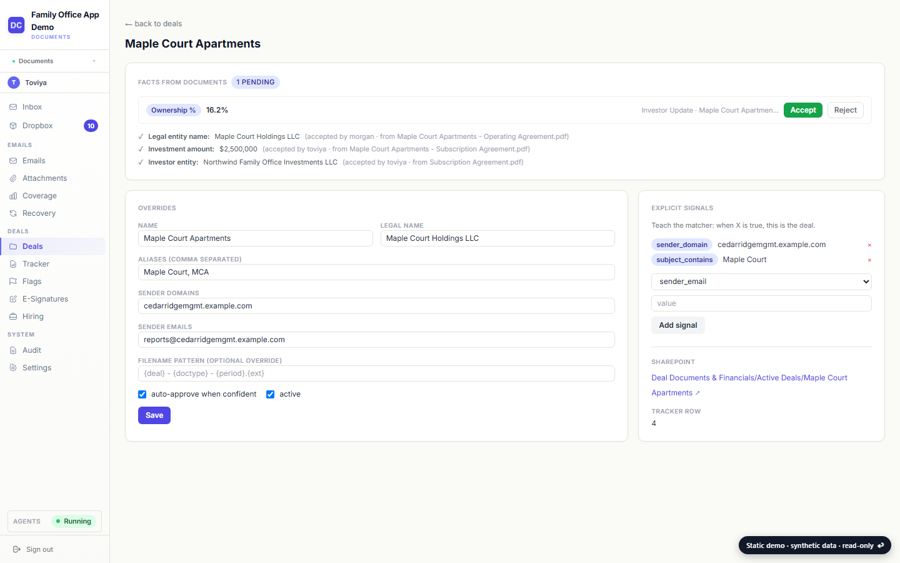
One deal
A deal's page: its facts read out of its own documents, the signals that route mail to it, where its folder lives and what has been filed there.
Open →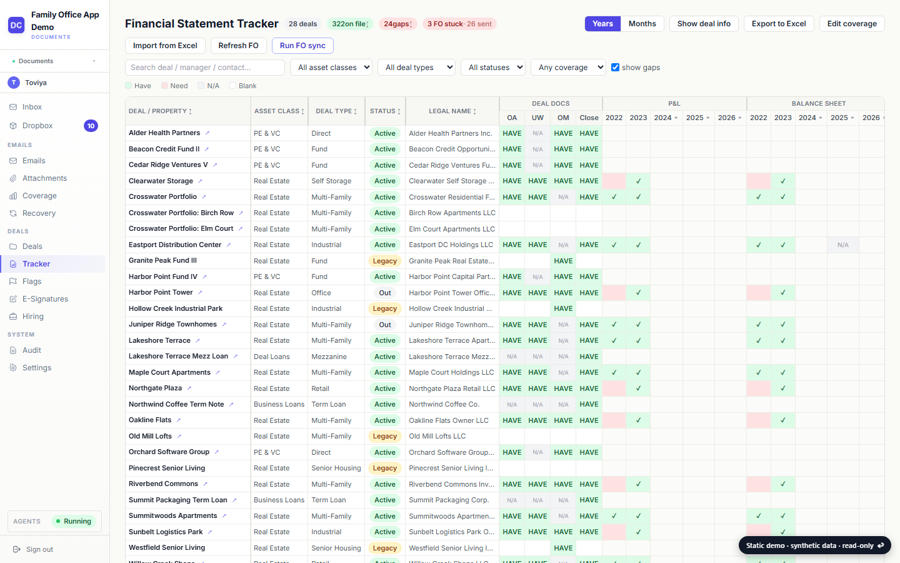
Financial statement tracker
Which statements each deal has sent, by month, quarter and year, lit from the documents actually filed and cross-checked against the platform's own financials.
Open →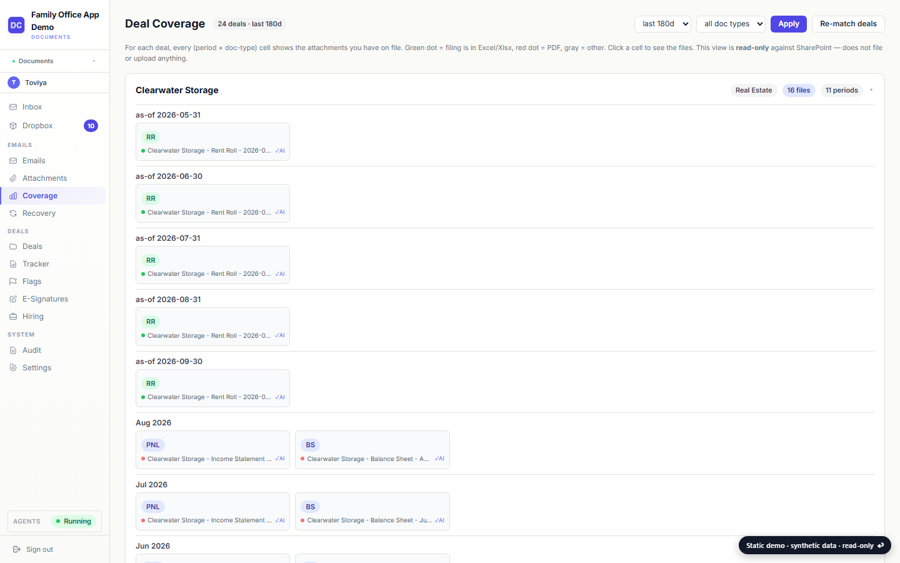
Coverage
The same question asked of the last six months of email: which deal sent which document for which period, and which have gone quiet.
Open →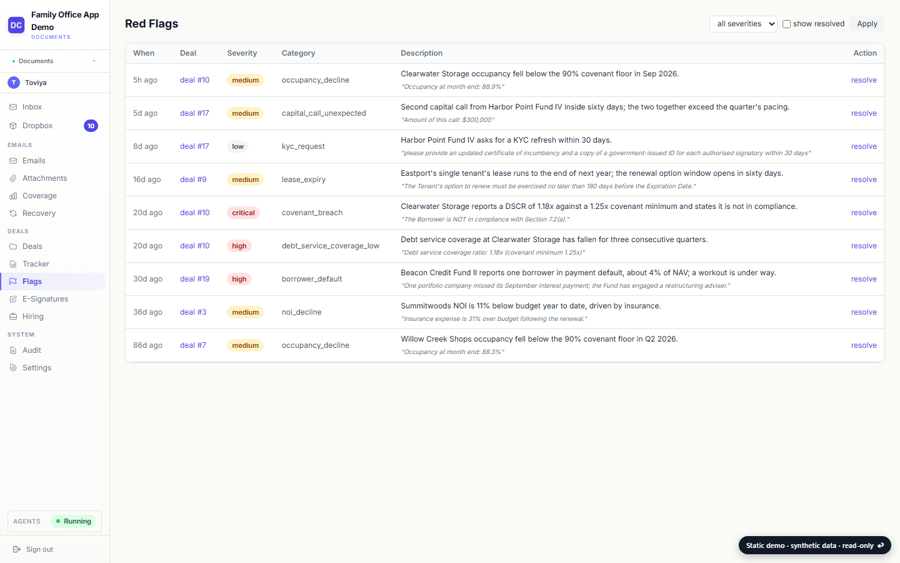
Red flags
What the reader noticed on the way through: a distribution cut, a covenant breach, an occupancy slide, each with the sentence it saw, open until a person resolves it.
Open →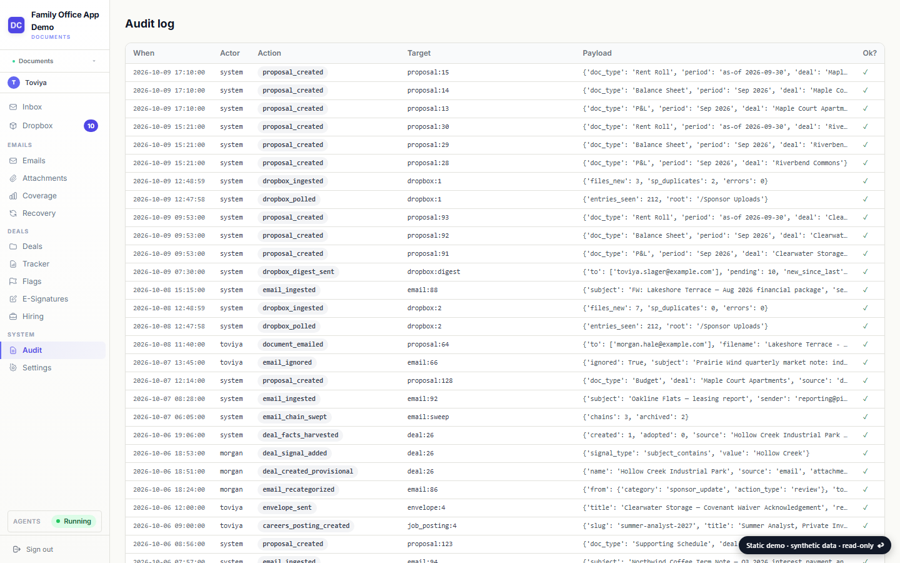
Audit log
Every decision the desk and the pipeline made, who made it and what it touched, from the day a file arrived.
Open →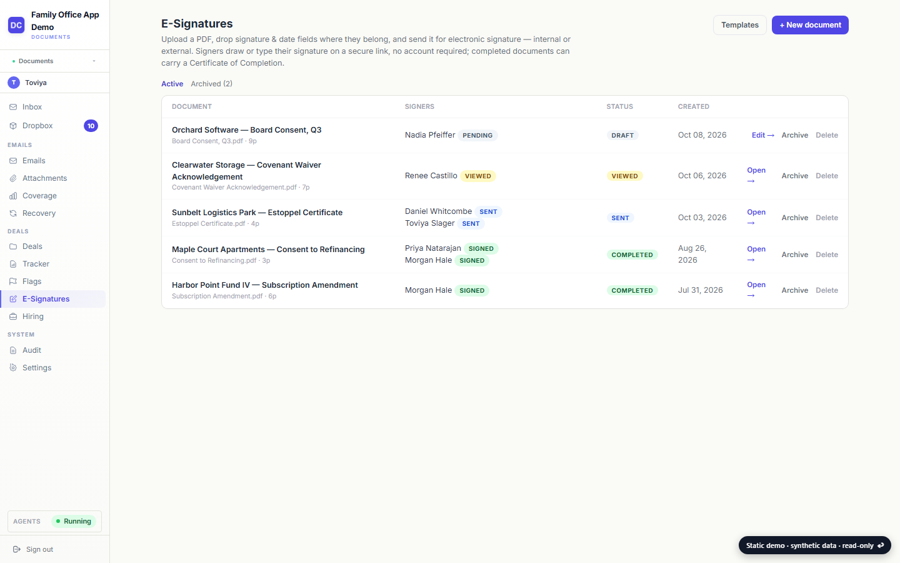
E-signature
Documents sent out for signature: who has viewed, who has signed, and the executed copy filed back to the deal.
Open →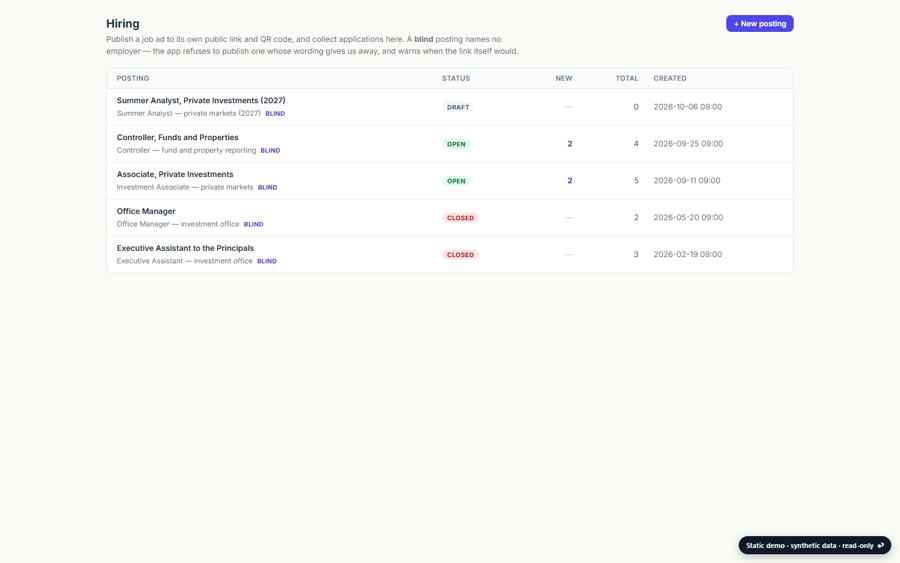
Careers
Blind job postings and the applications they drew, kept apart from the deal mail by design.
Open →What you are looking at
Documents is the application that watches a family office's shared investments mailbox. Sponsors, fund administrators, lenders and counsel send statements, notices and letters to one address; the app reads each one, works out which deal it belongs to, what kind of document it is and which period it covers, proposes a filename and a folder, and files it into the office's document library once a person says yes.
Some of the parts worth a look:
- A proposal, never an action. The reader proposes a destination for every attachment and every important email body; nothing moves until a reviewer approves it, and the audit log keeps the decision with the person who made it.
- Coverage is derived from what was filed. The statement tracker lights a cell when a document for that deal and period actually landed in the library, so the grid is a record rather than a checklist someone remembers to tick.
- Red flags come from the text. A distribution cut or a covenant breach is flagged with the sentence it was read from, and stays open until a person resolves it.
- Two side doors share the pipeline. Files dropped into a shared Dropbox folder and documents sent out for e-signature are routed through the same deal registry and filed into the same folders.
How it is built
Python and Flask on PostgreSQL, server-rendered pages with Alpine.js. The mailbox is read through the Microsoft Graph API and the library is SharePoint, reached through the same API; the app never holds a copy of a document longer than it takes to read it.
- Reading is a model's job; filing is a person's. A language model reads each email and attachment and proposes deal, type, period, folder and name, and every proposal carries the evidence it rests on. Nothing moves until a reviewer approves it, and the reviewer's decision is what the audit log records.
- A sandbox library beside the real one. Every automated operation is exercised against a sandbox copy of the library first, and the real library is protected by a no-break rule: existing files are never renamed, moved or deleted by the pipeline on its own.
- Deals are identified by path, not by name, because the real and sandbox libraries carry the same folder names; an operation that cannot tell which library it is in refuses.
- Cleanup and bulk operations go through a token-guarded API that moves files by content hash, so a planned reorganisation can be reviewed as a plan and replayed safely.
- Over a thousand tests, checked by mutation, including the period detector driven over the real file names the office has received, so a new labelling habit from a sponsor is caught by a test rather than by a misfiled statement.
The code itself is private. If you would like to walk through it, get in touch.