Interactive demo

The operating system behind a family office

Five applications I designed, built and run for a single family office, open here as one live, read-only demo. Every account, position, deal, document and person in it is invented; the screens, the workflows and the market data are the real thing.

Opens in Stocks. Move between the five apps with the switcher at the top of the sidebar. No sign-in, nothing to install.

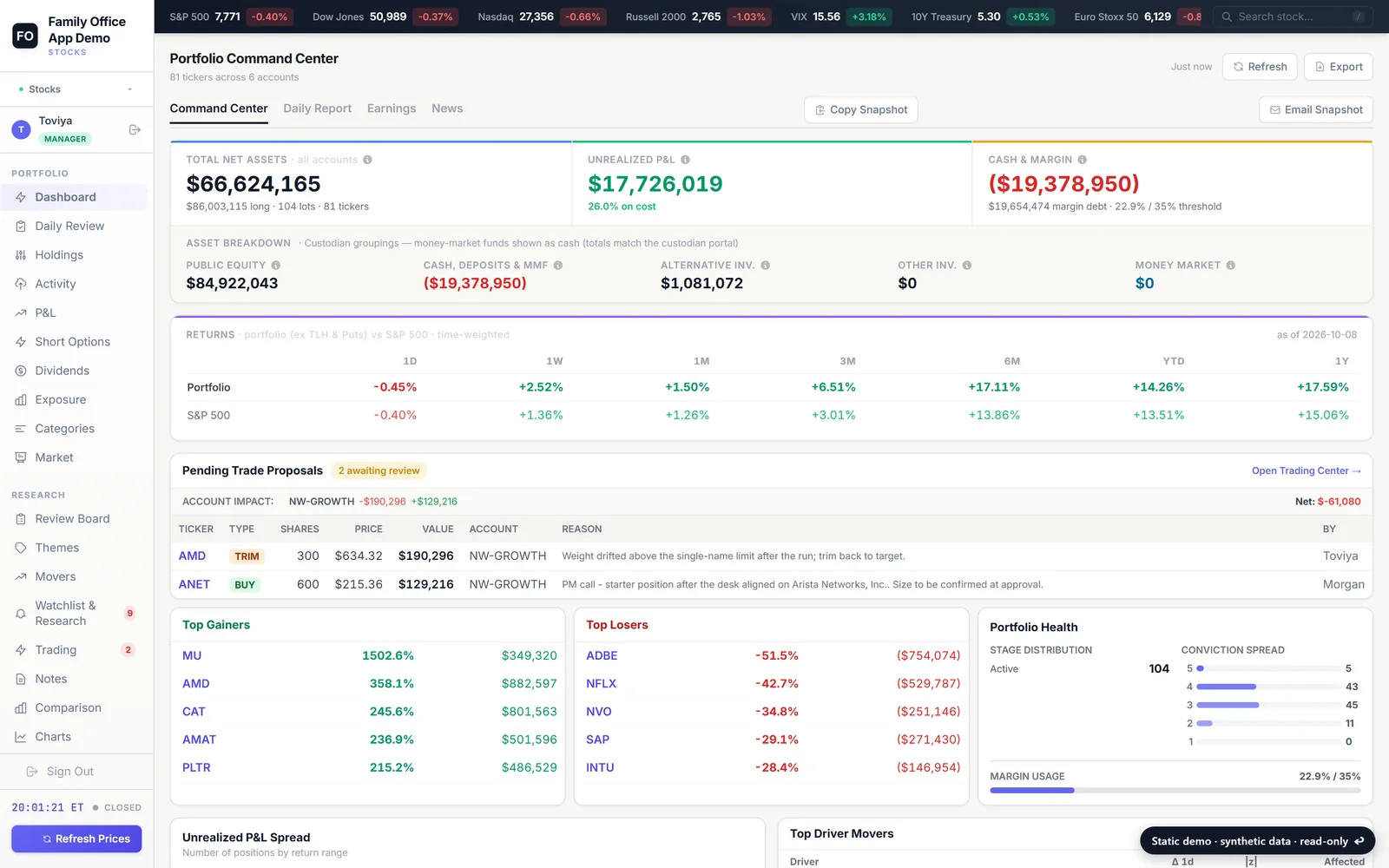
The Stocks app's portfolio dashboard
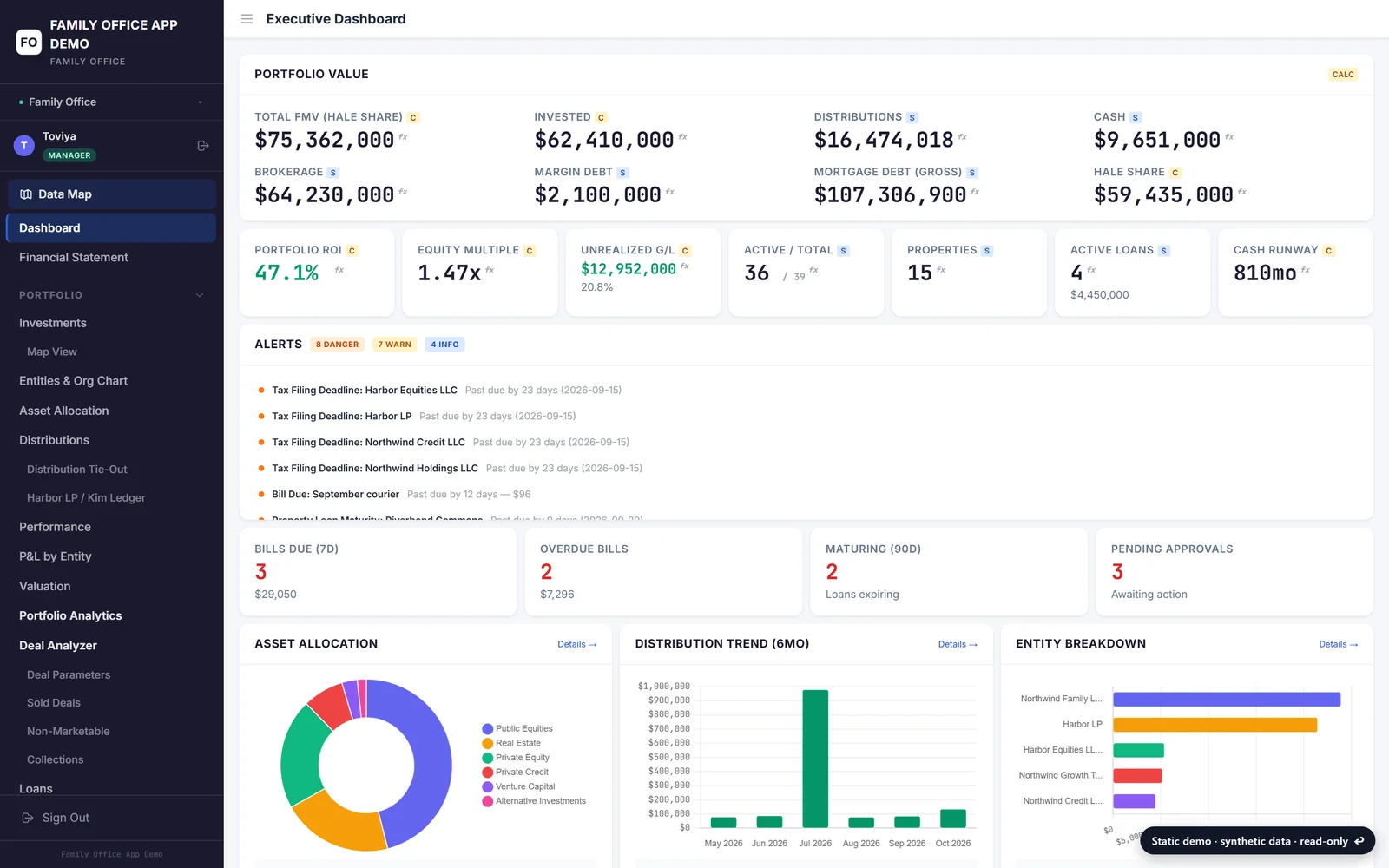
The Family Office app's executive dashboard
Read-only, synthetic data. Each app is a capture of the live application with an invented book behind it. Buttons that would save, send, trade or refresh say so instead of acting. Nothing in it belongs to the office, and nothing is connected to a server.
Five apps, one platform

Pick an app

Each card opens straight into that app's live demo. Details explains what it does and which screens to open first.

Stocks

The portfolio manager for a multi-account equity book: a daily review, a research pipeline, P&L and the briefings.
Live demo

Family Office

The office's system of record: every entity and investment, the properties, distributions, treasury and tax.

Live demo

Deal Evaluator

Where new deals get decided: a staged pipeline, per-type scoring, underwriting and a memo that grows with the deal.

Live demo

PE / VC

A monitor for the private book: marks and multiples, operating scorecards and every investor update, read.

Live demo

Documents

The mailbox that files itself: it reads every email and attachment, proposes where it goes, and a person approves.

Live demo
The platform

What this is

A family office runs on a surprising amount of software it never set out to own: a book of public equities across many brokerage accounts, a few hundred private investments held through a web of entities, dozens of properties each sending a monthly statement in its manager's own format, a shared mailbox that receives thousands of documents a year, and a pipeline of new deals that each need a decision. For years that lived in linked workbooks, email threads and a few people's memories. These five applications replaced that, one domain at a time, and they are used every working day by the people who run the office.

They were built in-house, by one person, on one stack: Python and Flask, PostgreSQL, server-rendered pages with a light reactive layer, and a careful use of language models where reading unstructured material is the job. Each one has a daily rhythm of its own, with overnight feeds, scheduled briefings and background workers, and each is covered by a large test suite that is deliberately checked by mutation, so a test that cannot fail is found before it is trusted.

The demo is each live application captured page by page, over an invented book that was generated to be realistic rather than tidy: positions that disagree with each other, statements with a line the mapping does not know, deals stuck in a stage, a filing that is late. That is what the real thing looks like, and it is what these tools are for.

One platform

What the five share

Single sign-on

One identity across every app, with per-app access grants, device alerts and an account switcher for the people who wear several hats.

One database cluster

A single PostgreSQL cluster with per-app roles, boot-time migrations serialised with advisory locks, and no silent fallbacks to anything else.

A shared assistant

An in-app assistant that can read any app the signed-in person is allowed to see, through the apps' own calculations rather than raw tables.

Backups that restore

Every database, repository and secret captured nightly to two object stores, one of them immutable, and the whole platform rebuilt from that copy in a rehearsal.

Deploy on every push

A webhook per app, a serialised safe-deploy that waits out a running import, and a web/worker split so a background job can never take a page down.

Tests that are tested

Thousands of tests across the five, with mutation passes that re-introduce each defect to prove the test that guards it can actually fail.

The code is private. If you would like to walk through any of it, get in touch.

Stocks

A portfolio management platform for a family office

The portfolio manager for a multi-account public-equities book. A nightly custodian feed and live pricing feed a daily review that scores every holding against the desk's own limits, a research pipeline where analysts vote and only the portfolio manager's converted call becomes a trade, and a set of morning and post-close briefings written for people who have fifteen seconds.

1,387pages captured into the demo
82public tickers in the invented book
—tax lots across 5 invented accounts
5,500+tests in the real codebase

What it does

01

The book, reconciled nightly

The custodian's encrypted daily feed is decrypted, parsed and reconciled into tax lots per account every morning, with the accounts, activity and true tax-lot files alongside it; external custodians and placeholders live in the same book under rules that keep them from being overwritten. Market value follows a stated policy: live price for liquid equities, the custodian's mark for everything a live quote cannot be trusted on.

02

A daily review that knows what is new

Every position is scored on ~117 measures against the same limits the fundamentals monitor fires at, with the strip leading each row: problems, how far past the line, strengths. An attention memory remembers every red cell, so the email and the table lead with what is new or worse and park what the desk has already seen or snoozed.

03

Monitors the desk configures

The fundamentals monitor cuts the book five ways and watches each stock on the union of its groups' checks; the groups, the checks and the limits are edited on the Groupings page, every metric is defined in plain words, and a stock with no group is proposed one with the reason attached.

04

A review board with a PM model

Pipeline and portfolio on one table with a registry of 145 columns, custom note columns, source and reason for every name, and votes from the desk. A vote is advisory; a trade is filed only when the portfolio manager converts a call, sized per account, and nothing an agent writes can ever reach the trade queue.

05

Research with provenance

Notes, imported emails and clippings tagged to tickers; a versioned human thesis per stock with a single writer; an enricher that drafts segments, competitors and tags for every new name; evidence chips captured from the report by clicking the figure that made the case.

06

Topic reports that do the discovery

A theme is framed into its value chain, each segment is populated by search until it runs dry, every symbol is verified against a live quote and the company name, cross-listings collapse to one row, and a two-pass judge ranks the whole list and then writes the case for every name: tier, odds and their basis, differentiation, success and failure cases, which side of a shift it is on.

07

Markets, read every day

Universe movers re-derived from real bars with a swing-pattern read and an AI screen of the headlines; a 13F tracker over a hundred-odd managers diffed quarter on quarter and matched to the book; COT positioning; a hundred-year chart of the market's important moments.

08

Exposure under one denominator

Sector, industry and country concentration as GICS at the read boundary, with funds itemised as what they are rather than filed under an issuer's sector; the drivers system that maps every position to the scenarios that move it, country signals and a strategy map.

09

P&L the custodian would sign

Time-weighted return chained from the custodian's own daily net liquidation values with real external cash flows only, levered and unlevered; fees, interest, commissions and withholding by year, account and entity, counting each confirm once whatever its status history.

10

Briefings written for fifteen seconds

Twenty-odd scheduled emails: the morning Compare digest with both sides of every featured name and two workbooks attached, the post-close snapshot with bull and bear cases on the big movers, company news filtered for materiality, investment ideas mined from the day's articles with every source verified in code, earnings, 13F, universe movers, each opening with an instructions box.

Read-only · invented data · no sign-inOpen the live demo →
Family Office

The system of record for a family's investments

The operating platform for the office itself and its system of record: every entity, every investment across private equity, credit, real estate, funds and operating companies, the distributions and capital that flow between them, the properties with their manager statements, loans, treasury, tax and the month-end close. It replaced the linked workbooks the office ran on.

1,487pages captured into the demo
35invented deals across five asset classes
12entities in the ownership chain
10,000+tests in the real codebase

What it does

01

Investments and the ownership chain

Every deal is stored once per holding entity, and the entity graph attributes each dollar to the family exactly once. Invested capital, marks, realised proceeds and the family's effective share roll up from the holding entity to the dashboard, the org chart shows how, and the sold and non-marketable books keep their own history.

02

Distributions from the ledger

Each distribution is classified from the actual transaction lines into operations, return of capital and sponsor economics, and tied out against the sponsor's notice. DPI, RVPI and TVPI by deal, vintage, manager and asset class are computed from those postings, so a multiple on screen can be traced to the lines behind it.

03

Real estate, statement by statement

Every property carries its manager's monthly package. A chart-of-accounts mapping translates each manager's own format into one set of standard terms, a tie-out proves the translated figures add up to the printed totals, and the raw workbook stays one click from any number. NOI, debt service and cash flow are compared across properties and periods and against budget and underwriting.

04

Cash and treasury

Balances by account and entity, a thirteen-week forecast, expected cash from every stream the book is owed, recurring-cash detection over the QuickBooks ledger, a cash grid by deal, outgoing wires with their approval files, brokerage balances and the weekly cash report that goes out on a schedule.

05

The month-end close

A close checklist, a reconciliation centre, weekly cash and check-deposit checklists, brokerage and financial-statement tracking, and the QuickBooks financial reports themselves, so the close is a list of states that someone can read rather than a sequence someone has to remember.

06

Tax season as data

Which K-1s and 1099s are expected and which have arrived, which entities file what and when, booked income checked line by line against QuickBooks, a capital roll-forward per deal, 1031 exchanges with their deadlines, and the exception reviews that fall out of the season.

07

Loans, intercompany and shared expenses

Loans receivable with balances, rates, maturities, payments, notes and documents; a loan intake for new requests; the intercompany journal between entities; and the expenses one entity pays on behalf of another, allocated on recorded keys rather than by hand.

08

Operations, insurance and risk

Bills with a CEO approval step, vendor statements, subscriptions detected from the card ledger, property tax bills, insurance policies with their limits and renewals, risk registers against appetite thresholds, a business-continuity plan for every system the office depends on, entity compliance filings and legal matters.

09

Reporting

A report centre that knows the status of every report the office produces, a personal financial statement, performance and allocation views on an invested or a market basis, budget versus actual, a portfolio pack, important dates, and a report card that grades each property manager on the figures they sent.

Read-only · invented data · no sign-inOpen the live demo →
Deal Evaluator

A deal pipeline that scores, underwrites and remembers

Where inbound opportunities get decided. A deal arrives by email or by hand, is classified into one of seven types, moves through named stages with a responsible owner at each, is scored on a per-type rubric with red-flag knockouts, underwritten against the sponsor's own numbers, and written up in a memo that grows with the stage instead of being rewritten.

486pages captured into the demo
29invented deals across 7 deal types
48rubric evaluations scored
1,200+tests in the real codebase

What it does

01

Intake and classification

A forwarded email or a deck is read into a draft record: sponsor, asset, ask, terms and the documents that came with it. The deal is classified into one of seven types (venture, private equity, credit, fund, multifamily, industrial, commercial), which decides its checklist, rubric and stage ownership from then on.

02

The pipeline

Every live deal on a board by stage, with its owner, its health, what it is waiting on and how long it has been there; the same book as a filterable table with lead, score, days in stage and follow-ups; an archive for the deals that were passed or snoozed, with the date they come back.

03

Stage ownership and sign-offs

One owner per deal type and stage, so a deal is never without a name on it. A sign-off puts a deal in the principal's court for review and records who moved it and when, but gates nothing: anyone can move any deal, and the system keeps the record of who did.

04

Rubric scoring

Per-type questions grouped into weighted sections, red-flag knockouts that cap a score however well the rest reads, a share reserved for the evaluator's own judgement, and a recommendation computed from the answers. The weights per type are edited in the app.

05

Underwriting

A standardised multifamily underwrite hung off the deal: every income and expense line driven by a method (the house standard, the trailing twelve months, the sponsor's budget or a custom figure), reconciled against the T-12 and the sponsor's numbers in one grid, with a five-year pro-forma, returns and the waterfall. A library of standard bands sets what the house expects for each line.

06

Comps

Peer, sale and prior-sale comparables summarised per deal with the subject held out of its own peer set, so a property is never compared against itself; rent, price per unit and cap rate against the set, with the sources recorded.

07

Stage memos

One memo that grows with the deal. A section written at screening is carried into the first assessment and the underwriting memo rather than rewritten, every section is attributed and dated, and the combined dossier points back to the sections instead of copying them.

08

Follow-ups and comparisons

Every reminder on the book by urgency and kind, including the re-evaluate snoozes that archive a deal until a date; side-by-side scores and a section radar for any set of deals, with one-click sets by type.

09

Documents, emails and the file

The documents and emails that brought a deal in and everything added since, on the deal's page, with the AI reading only those files when asked to summarise or draft.

Read-only · invented data · no sign-inOpen the live demo →
PE / VC

A monitor for private funds and companies

A monitor for the private book: funds and direct companies with cost, mark, distributions and multiples, an operating scorecard that reads each company's own reports against its plan, coverage that says who is actually reporting, and a review queue where a model's proposed figures wait for a person before they count.

206pages captured into the demo
41invented positions, funds and companies
2,567operating figures on file
600+tests in the real codebase

What it does

01

Positions

Every fund and direct position with cost, mark, realised proceeds, unfunded commitment, multiples and IRR, drawn from the family-office platform's record so the two can never disagree, with the office's allocations and the share of each vehicle the family actually owns.

02

Attention rules

Positions flagged by rule rather than by memory: a mark that has not moved in too long, an income stream that has stalled, a position marked below cost, a high risk score, a gap in the data the office expects. Each flag names the rule and the figure that tripped it.

03

The operating scorecard

A universal spine of metrics for every direct company (revenue, EBITDA, cash, burn, runway, headcount) scored against the plan the company sent, within one reporting cadence, with red and amber exceptions on one board.

04

Coverage

Who is actually reporting: the newest document on file for each position against the cadence the office expects, split into current, overdue and dark, with the dark companies and the fund holdings queued first for extraction.

05

Documents become data

Every file a company or fund sends is classified and dated from its name, the investor letters are read by a model that proposes figures and a headline, and the company's own accounts are kept period by period as they wrote them, with a tie-out that says whether the figures add up.

06

The review queue

Figures and headlines the reader proposed from a document wait here for a person to approve or reject them; nothing proposed counts in a position, a scorecard or a feed until it has been approved, and a rejection is kept as a decision.

07

Updates and the story of a deal

The book's news feed: every headline read out of an investor letter, dated and ranked by significance; and for any one company, its whole history in order — the cheque, every report and letter since, and every dollar back.

08

Funds get their own lens

A blind pool has no P&L but it has a portfolio: the schedule of investments is read into a holdings grid, companies down and report dates across, with the fund's own printed totals kept beside the parsed figures so a parsing error can never pass as a fact.

09

Capital is attributed

A commitment or a balance read off a statement is tagged with whose position it describes, so a pooled vehicle's figure can never be shown as the office's own and a co-investment is never double counted.

Read-only · invented data · no sign-inOpen the live demo →
Documents

A mailbox that files itself, with a person in the loop

The mailbox that files itself, with a person in the loop. Sponsors, administrators, lenders and counsel write to one address; the app reads each email and attachment, works out which deal and period it belongs to, proposes a folder and a name, and files it only when a reviewer says so. A statement tracker lights up from what was actually filed.

956pages captured into the demo
98invented emails in the inbox
153attachments read and routed
1,000+tests in the real codebase

What it does

01

The review queue

The inbox as a queue of cards: each email, what it carried, which deal and period the reader matched it to, the folder and name it proposes and a line on what it made of the email. Approve, redirect or decline; a declined proposal is remembered as a decision, so the same file is never proposed twice.

02

Deal registry

Every deal the office tracks with its aliases, the sender domains that write about it, the library folder it files under and the facts read out of its own documents. A new sponsor or a renamed vehicle is a registry edit, not a code change.

03

Type and period detection

Statements, notices, calls, K-1s, rent rolls and manager packages are recognised by their shape and named consistently; the period comes from the file name before the subject, so a sponsor's own labelling wins over an email's date. Each email chain is treated as one thing, and one copy per folder is the rule.

04

The statement tracker

Deal by document category by period, lit from the documents actually filed in the library rather than from a checklist, with the family-office platform's own financials cross-checked against it so a figure that was filed and a figure that was booked can be compared.

05

Coverage

The same question asked of the last six months of email: which deal sent which document for which period, which are late against their cadence, and which have gone quiet.

06

Red flags

A distribution cut, a covenant breach, an occupancy slide or a capital call out of pattern is flagged from the text of the document with the sentence it was read from, and stays open on the flags page until a person resolves it.

07

Dropbox queue and e-signature

Files sponsors drop into a shared folder are walked as a tree, read and routed through the same registry, or marked as already on file. Documents sent out for signature are tracked through viewed and signed, and the executed copy is filed back to its deal.

08

Hiring, kept apart

Blind job postings and the applications they draw run through the same mailbox but are kept entirely apart from the deal mail, with their own queue and their own folder.

09

The audit log

Every proposal, approval, redirect, decline, filing and flag resolution with the person or process that made it and what it touched, so any file's history can be read back from the day it arrived.

Read-only · invented data · no sign-inOpen the live demo →